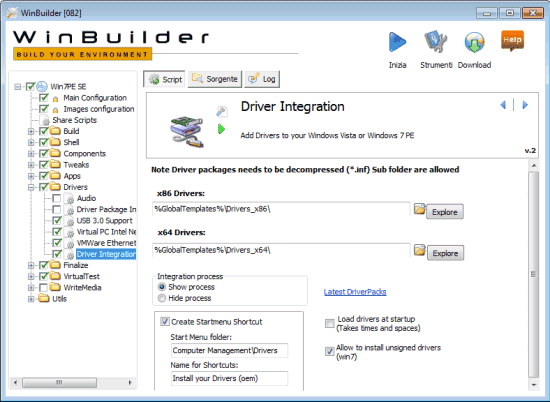
Driver Integration Winbuilder Script
WinBuilder is an interesting tool which makes it easier to create Windows-based boot discs. In a click or two you can, for instance, choose the type of disc you'd.
Lk21 drama korea doctors. USB drives have become a ubiquitous commodity. Many people have one and some carry their USB drive on their keychain.
Bila membutuhkan beberapa item tambahan kamu bisa membelinya dengan Steam Wallet atau menggunakan uang dalam game. Keseruan itu pun bisa bertambah saat dimainkan bersama teman sehingga membuat game PC ringan ini jadi ajang genosida massal. Daftar full list game pc multiplayer via landers.
This provides easy access to handy data such as passwords, games, photos, etc. VistaPE is the preinstall environment for the installation of Windows Vista. When you first boot to a Vista DVD, the GUI screen you see during installation is VistaPE. It was designed for use on DVD's and USB drives. It provides a graphical environment using a small amount of resources.
It's very flexible in that you can add components to provide additional features. Having a VistaPE bootable USB drive has some additional advantages: - Familiar interface where you can run Windows programs - Browse the Internet without leaving a trace on the host PC - Remove undeleteable spyware and viruses - Flash the BIOS in a clean environment - Diagnose computer problems Being able to remove spyware and viruses is an incredible handy ability. You should be able to remove all of those problems since they won't be able to start automatically. I've used mine many times to get rid of nasty viruses on other peoples computers. Here's how to create a VistaPE USB drive: What you need: USB drive (128MB minimum, 1GB+ preferred) Windows Vista DVD (preferred) or Computer with Windows XP or Vista Let's get started! Winbuilder is a single file.
Once you've downloaded it from website, extract it to a folder on your hard drive and then run it.:Edit: Select the Server button and put a checkbox in VistaPE.net/project and click Download:EndEdit: Deselect everything except for the VistaPE Core option. I unchecked some other options to speed things up, you can select applications that you want integrated into VistaPE. Click download. This will take some time as it downloads scripts and files necessary for this operation. At this point, the HP USB format tool should pop up. Select your USB drive from the list. You can select the quick format option to speed things up.
Click the Start button to format the USB drive *WARNING: All contents of the USB drive will be erased! Once the drive is formatted, you should see a dosbox with files being copied to your USB drive After that, the GRUB4DOS utility should pop up. This will put the required info onto your USB drive to make it boot to Gruub4Dos. Click on the Disk radio button Use the drop down to select your USB drive Click Install That's it! Your USB drive should now be bootable to VistaPE!
Stick your USB drive into your test computer and boot to it. You may need to change your boot priority in the BIOS. Some systems have an option to press F12 (or some other key) to bring up a boot menu to boot to your USB drive.
The first screen you should see is the Grub4Dos screen. Depending on how fast your system is, you should get to the VistaPE desktop in less than a minute. Let me know if there's something confusing. I'll add some additional information later. Windows Background.
Building a boot USB, DVD or CD based on Windows 7 with Winbuilder and Win7PE SE Tutorial Building a boot USB, DVD or CD based on Windows 7 with WinBuilder and Win7PE SE Tutorial As many of you know, I’m a big fan of Bart’s PeBuilder and derivative works based on it like UBDC4Win. Having a bootable USB drive or CD I can run Windows tools from just comes in hand so often for task like malware/spyware removal, system recovery and harvesting locked files for “pro bono pen-test purposes”. Unfortunately, the Bart’s PE project has not been updated in awhile, and Windows XP is getting kind of long in the tooth, so I went looking for a replacement. For those wanting to build something a little newer, check out WinBuilder. WinBuilder is essentially a scripting framework for making bootable Windows PE CDs/DVDs/USBs.